Redux Toolkit

A passionate MERN Stack Developer from India
I am a full stack web developer with experience in building responsive websites and applications using JavaScript frameworks like ReactJS, NodeJs, Express etc.,
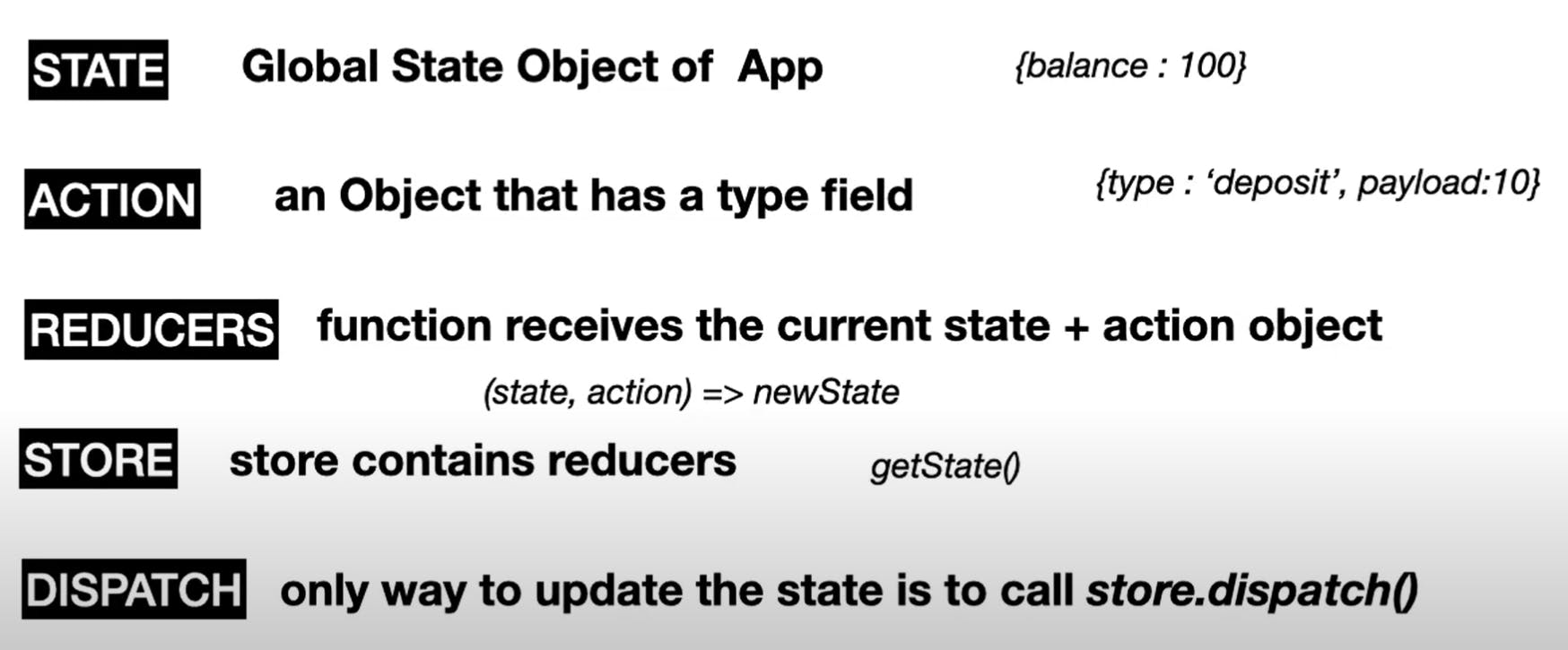
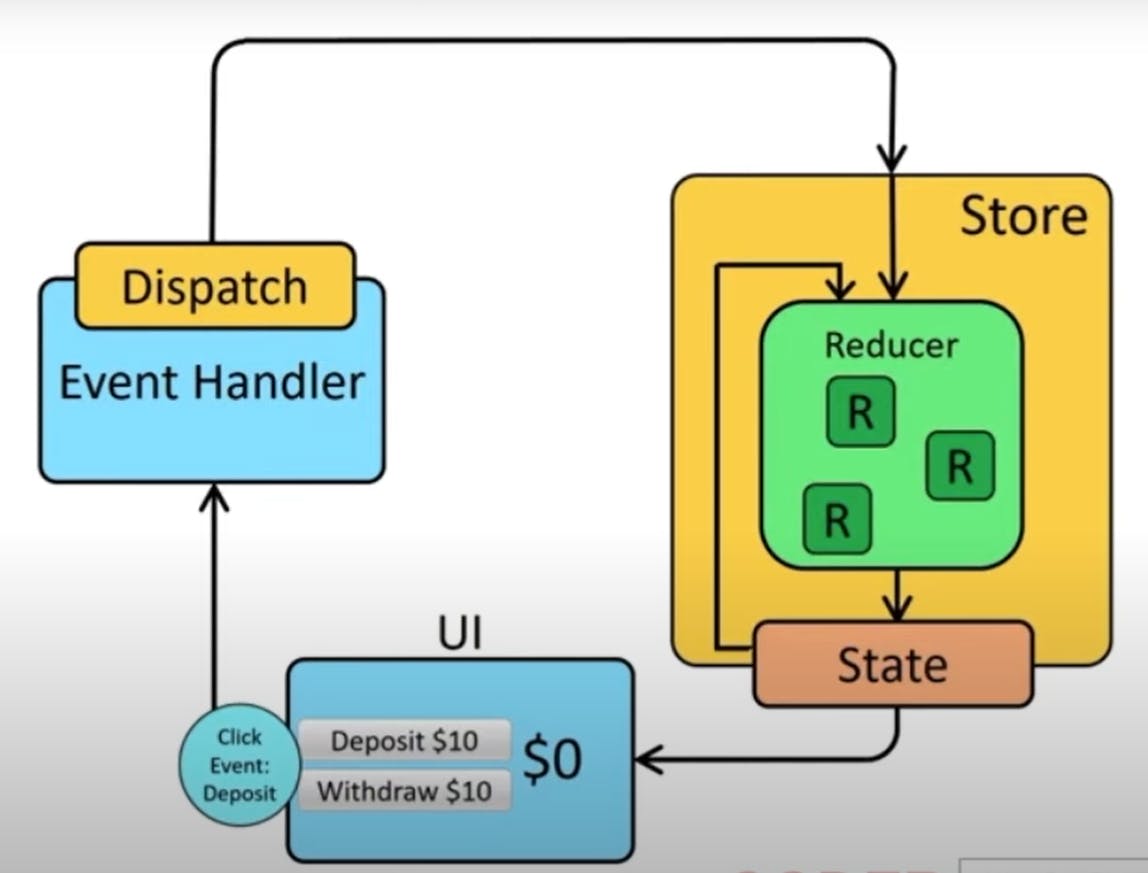
Redux Toolkit is a powerful and modern way to manage state in React applications. It simplifies the setup and usage of Redux with a set of tools and best practices. Here’s a brief overview of how to get started with Redux Toolkit in a React project:
0. Redux Toolkit Folder Structure
src/
│
├── 📂store/
│   ├── store.js             # Redux store configuration
│   ├── 📂actions/               # Folder for action creators or related logic
│   │   ├── authActions.js   # Example actions file
│   │   └── postsActions.js  # Example actions file
│   ├── 📂reducers/              # Folder for reducers and slices
│   │   ├── yourSlice.js
│   │   ├── authSlice.js     # Example slice for authentication
│   │   ├── postsSlice.js    # Example slice for posts
│   │   └── ...              # Other slices
│   └── 📂api/                 # Optional: API functions or services
│       ├── authAPI.js       # Example API functions for authentication
│       ├── postsAPI.js      # Example API functions for posts
│       └── ...              # Other API functions
1. Installation
First, install Redux Toolkit and React-Redux:
npm install @reduxjs/toolkit react-redux
2. Create a Redux Store
Create a file named store.js (or store.ts if you're using TypeScript) to configure the Redux store:
📂 /src/store/store.js
import { configureStore } from '@reduxjs/toolkit'; // Import the configureStore function from Redux Toolkit
import yourReducer from './reducers/yourSlice'; // Import the reducer from your slice file

// Configure and create the Redux store
const store = configureStore({
  reducer: {
     // Define the root reducer and the corresponding state key
    // Here, `NameOfStoreSlice` is the key in the state tree, and `yourReducer` is the reducer managing that part of the state
    NameOfStoreSlice: yourReducer,
    // 🗑️ counter: counterReducer
  },
});

export default store;
3. Create a Slice
This file contains your reducers and synchronous action creators:
📂 src/store/reducers/yourSlice.js or counterSlice.js
import { createSlice } from '@reduxjs/toolkit';

// Create a slice of the Redux store
// const counterSlice
const yourSlice = createSlice({
  // name: 'counter'
  name: 'NameOfTheSlice', // The name of the slice
  initialState: {
    yourValue: 0, // Initial state for yourValue
    yourData: [], // Initial state for yourData, an empty array
  },
  reducers: {
    increment: (state, action) => {
      // state.yourValue+= 1
      state.yourValue+= action.payload; // Payload is used here
    },
    decrement: (state) => {
      state.yourValue-= 1;
    },
    addData: (state, action) => {
      state.yourData.push(action.payload); // Add payload data to the array
    },
    removeData: (state, action) => {
      state.yourData= state.yourData.filter(item => item.id !== action.payload.id); // Remove item based on payload
    },
    fetchByAmount: (state, action) => {
      state.yourValue += action.payload;
    }
  },
});

// Export actions for use in components
export const { increment, decrement, addData, removeData } = yourSlice.actions;
// Export the reducer to be used in the store configuration
export default yourSlice.reducer;
4. Provide the Store to React
Wrap your application with the Provider component from react-redux and pass the store:
📂 /src/main.jsx
import ReactDOM from 'react-dom';
import { Provider } from 'react-redux' // Import Provider to make the Redux store available
import store from './store/store.jsx' // Import the configured Redux store

ReactDOM.createRoot(document.getElementById('root')).render(
  <Provider store={store} >
      <App />
  </Provider>
)
5. Use Redux State and Dispatch in Components
You can use the useSelector and useDispatch hooks to access and modify the state in your components:📂/src/components/Home.jsx
import React from 'react';
import { useSelector, useDispatch } from 'react-redux'; // Import hooks for accessing Redux state and dispatching actions
import { increment, decrement, addData, removeData } from '../store/reducers/yourSlice'; // // Import actions from the slice

const Counter = () => {
  // Access the current value of `yourValue` from the Redux state
  const count = useSelector((state) => state.NameOfStoreSlice.yourValue);
  const count = useSelector((state) => state.NameOfStoreSlice.yourValue);
  const data = useSelector((state) => state.NameOfStoreSlice.yourData);

  // Get the dispatch function for dispatching actions
  const dispatch = useDispatch();

  return (
    <div>
      <p>Count: {count}</p>
      <button onClick={() => dispatch(increment(5))}>Increment</button>
      <button onClick={() => dispatch(decrement(1))}>Decrement</button>
    </div>
  );
};

export default Counter;
Benefits of Redux Toolkit
Simplified Store Setup: Reduces boilerplate code and configuration.
Immutable State Updates: Utilizes Immer to handle immutable updates.
Built-in DevTools: Integrated with Redux DevTools Extension for debugging.
Actions File (yourActions.jsx)
This file handles asynchronous logic and exports both synchronous and asynchronous actions:
📂/store/actions/yourActions.jsx
// Centralizing and Re-exporting Actions for Simplified Imports
export { increment, decrement, addData, removeData } from "../reducers/yourSlice";

import { fetchByAmount } from "../reducers/yourSlice";

// Define an asynchronous action creator
export const fetchByAmountAsync = (amt) => async (dispatch, getState) => {
    try {
        // Log the current state to the console
        console.log(getState());

        // Simulate an asynchronous operation (e.g., API call) with setTimeout
        setTimeout(() => {
            dispatch(fetchByAmount(amt));
        }, 2000);
    } catch (error) {
        console.log(error);
    }
};
🚨 Warning: Use Consolidated Action Imports in Components for Better Organization 🚨
Avoid direct imports from yourSlice. Instead, use consolidated imports from yourAction for cleaner and more maintainable code.
📂/src/components/Home.jsx
// import { increment } from '../store/reducers/yourSlice'; ❌
import { increment, decrement, addData, removeData, fetchByAmountAsync } from '../store/actions/yourAction';