🧪Testing Library 🦑 - JEST
A passionate MERN Stack Developer from India
I am a full stack web developer with experience in building responsive websites and applications using JavaScript frameworks like ReactJS, NodeJs, Express etc.,
1. Types of testing (developer) :
Unit Testing : Testing One Component in Isolation || means seperately
Integration Testing : Testing Integration of Components
End to End Testing (or) e2e Testing :
End-to-end testing verifies that all components of a system can run under real-world scenarios. The goal of this form of testing is to simulate a user experience from start to finish. E2E testing can find software dependencies while also validating the system under test, its data integrity and integrations.
2.Setting up Testing in our app :
2.1 Install React Testing Library:
npm install --save-dev @testing-library/react @testing-library/dom
2.2 Install Jest
- Jest is a delightful JavaScript Testing Framework with a focus on simplicity.
npm install --save-dev jest
2.3 Additional Configuration → Using Babel
- To use Babel, install required dependencies:
npm install --save-dev babel-jest @babel/core @babel/preset-env
Configure Babel to target your current version of Node by creating a babel.config.js file in the root of your project:
Manually Create File: 📝 babel.config.js and paste below code
2.4 Configuring Babel
// FileName: 📝babel.config.js
module.exports = {
    presets: [['@babel/preset-env', { targets: { node: 'current' } }]],
};
3. Only for Parcel js (Optional)
To disable Babel transpilation in Parcel:
Create File: .parcelrc & paste below code
{
  "extends": "@parcel/config-default",
  "transformers": {
    "*.{js,mjs,jsx,cjs,ts,tsx}": [
      "@parcel/transformer-js",
      "@parcel/transformer-react-refresh-wrap"
    ]
  }
}
4. Running Tests
- Add a test script in your
package.jsonto make running the tests easier:
{
  "scripts": {
    "test": "jest"
  }
}
Now you can run your tests with:
npm test
or npm run test
5. Output
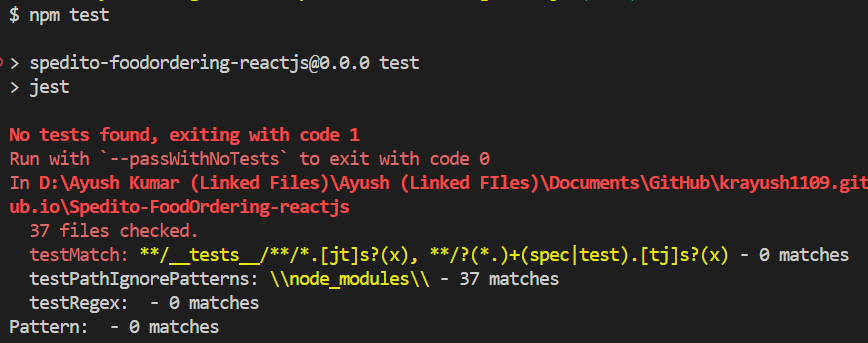
If it shows:
No tests foundIt means you have ✅ successfully setup the configuration.
6. JEST Configuration :
npx jest --init
- Select these below option when asked ⬇️
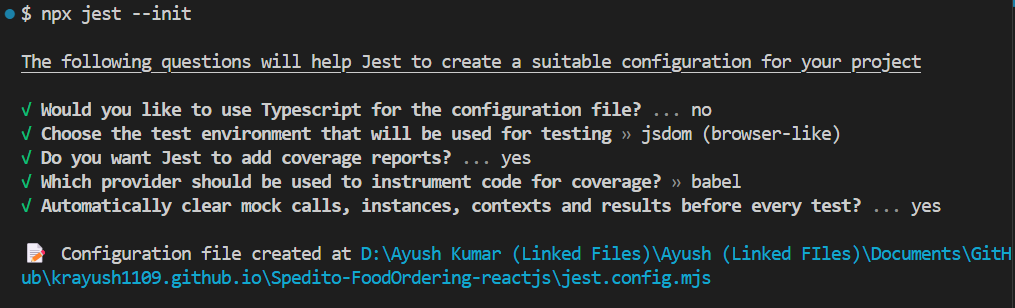
- A file will be now created with name: 📝
jest.config.mjs
7. jest-environment-jsdom
If you're using Jest 28 or later, jest-environment-jsdom package now must be installed separately.
npm install --save-dev jest-environment-jsdom
8. Test 📝Files or 📂 Folder Naming Conventions
Note: You can also use .js or .ts
1. Test File Naming Conventions:
.test.js: Example:Button.test.js.spec.js: Example:Button.spec.js
These suffixes help testing tools like Jest automatically recognize the test files.
2. Folder Organization :
A. Colocated Test Files (Alongside Components)
B. Separate
testsFolderC.
__tests__Folder ⭐⭐⭐
A. Colocated Test Files (Alongside Components)
Placing test files next to the component they’re testing is a widely used approach for better context:
src/
├── components/
│   ├── Button.js
│   ├── Button.test.js
Pros: Easier to navigate between the component and its test.
Cons: Can clutter the folder as the number of tests grows.
B. Separate tests Folder
For large projects, you may prefer to isolate tests into a separate folder:
src/
├── components/
│   ├── Button.js
tests/
├── components/
│   ├── Button.test.js
Pros: Centralized test files, keeping the codebase tidy.
Cons: Might require switching between directories during development.
C. __tests__ Folder ⭐
Another common option is to create a dedicated __tests__ folder inside relevant directories:
→ starting and ending with double underscores ‘__’.
→ Dunder here means “Double Under (Underscores)”.
src/
├── components/
│   ├── Button.js
│   ├── __tests__/
│       ├── Button.test.js
3. Integration & E2E Test Naming
If you are writing integration or end-to-end (E2E) tests, differentiate them from unit tests:
Integration Tests:
ComponentName.integration.test.jsE2E Tests:
ComponentName.e2e.test.js
This makes it clear what kind of test is being written.
4. Test Description Naming
In your test cases, use descriptive names for better readability:
describe('Button Component', () => {
  test('should render correctly', () => {
    // test logic
  });

  test('should handle click event', () => {
    // test logic
  });
});
- Use phrases like "should" to clarify the expected behavior of the component.